Affordable Unified Cybersecurity for SMBs in 2026: A Practical Guide to Cost-Efficient Cybersecurity Solutions for Small and Medium-Sized Businesses
Quick answer
The most affordable cybersecurity solutions for small and medium-sized businesses are rarely the cheapest individual tools. They are unified platforms that cover endpoint protection, network security, and data protection in one console, with predictable pricing and automation that reduces staff time. To choose cost-efficiently, inventory your current tools and spend, define must-have coverage, compare pricing models, calculate three-year total cost of ownership, choose an operating model, and consolidate in phases. Seceon’s asset-based, all-in-one platform is designed to reduce both license costs and the hidden costs of tool sprawl.
Most SMBs did not plan their security stack. They added antivirus, then a firewall, then email filtering, then backup, then a logging tool for an audit or an insurance renewal. Each purchase made sense at the time. Together, they create a stack that is expensive to run, hard to monitor, and full of gaps.
This guide shows SMB security buyers how to reduce that cost without reducing protection. It covers where the hidden costs sit, a six-step approach to choosing cost-efficient SMB security software, and how a unified platform like Seceon changes the economics of small business cybersecurity.
Why Tool Sprawl Makes SMB Security Expensive
Quick answer
Tool sprawl raises SMB security costs in two ways: overlapping license fees, and hidden operating costs such as integration upkeep, duplicate alert triage, multiple agents and renewals, training, manual compliance work, and incidents missed in the gaps between tools.
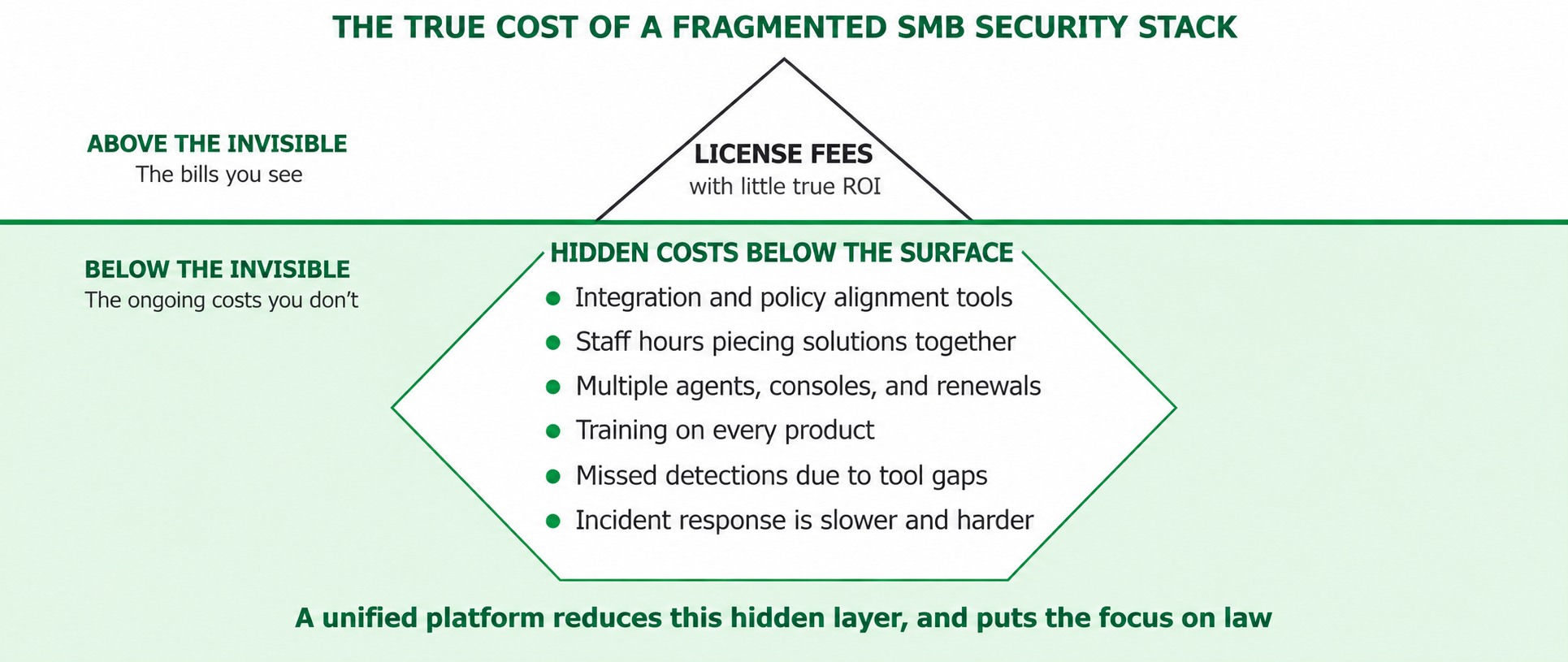
Figure 1. License fees are the visible part of security cost; operating costs sit below the surface
| Cost Type | Examples | Why It Grows with Sprawl |
| Visible: licenses | Endpoint, firewall subscription, email filter, backup, logging, DLP | Overlapping features are paid for more than once |
| Hidden: staff time | Checking several consoles, triaging duplicate alerts, manual response | Each tool adds alerts that must be reviewed separately |
| Hidden: integration | Connectors, scripts, log forwarding, version upgrades | Integrations break and need maintenance |
| Hidden: administration | Multiple renewals, vendor contacts, agents, and training | Every vendor adds procurement and support overhead |
| Hidden: compliance | Collecting evidence for audits, insurers, and customer questionnaires | Evidence must be pulled manually from each tool |
| Hidden: risk | Attacks that move between endpoint, network, and email unnoticed | No tool sees the full attack chain |
What “Affordable” Really Means for SMB Cybersecurity
Quick answer
Affordable SMB cybersecurity means the lowest total cost to protect every asset over time, including licenses, staff hours, integration, and incident impact. A lower license price can still cost more if it adds consoles, alerts, and gaps.
Two measures help SMBs compare fairly:
A cost-efficient solution scores well on both. It covers more layers with fewer products and needs less staff time to run.
STEP 1 Inventory Your Current Tools and Spend
Start by listing every security product, subscription, and service you pay for, along with who manages it and how much time it takes each week. Most SMBs find overlap, such as two tools collecting the same logs or several agents on every laptop.
| Category | Typical SMB Tool | Questions to Answer |
| Endpoint | Antivirus or EDR | Does it detect ransomware behavior, or only known malware? |
| Network | Firewall and VPN | Is anyone reviewing network alerts or traffic anomalies? |
| Email filter or built-in protection | Does it catch business email compromise and account takeover? | |
| Data | DLP, file monitoring, or none | Do you know where sensitive data is and when it moves? |
| Visibility | Log tool, SIEM, or none | Can you see an attack that spans devices, network, and email? |
| Response | Manual, or scripts | How long does it take to isolate an infected device? |
STEP 2 Define Must-Have Coverage
Base your requirements on how SMBs are actually attacked: ransomware, phishing and business email compromise, stolen credentials, and data theft. That translates into three core layers plus two supporting layers:
Anything that covers only one of these layers should be justified against a platform that covers several.
STEP 3 Compare Pricing Models, Not Just Prices
How a vendor charges matters as much as what it charges. Some models are predictable. Others grow faster than your business.
| Pricing Model | How It Works | Budget Predictability | Watch Out For |
| Per user or per endpoint | Fixed fee per device or person | High | Separate fees for servers, cloud workloads, or add-on modules |
| Per asset, all modules included | One fee per protected asset covering the full platform | High | Confirm exactly which modules are included |
| Per GB ingested | Cost rises with log and data volume | Low | Pressure to reduce visibility to control cost |
| Base plus add-on modules | Core product plus paid SIEM, SOAR, DLP, or compliance | Medium | Costs rising as you add essential capabilities |
| Managed service (MDR) per seat | Monitoring and response service fee | Medium to high | Which tools are included, and what counts as out of scope |
STEP 4 Calculate Three-Year Total Cost of Ownership
Compare every option over three years, not one. Include all of the following:
| TCO Component | What to Include | How a Unified Platform Changes It |
| Licenses and subscriptions | Every security product and add-on | Fewer products and renewals |
| Deployment | Setup, agents, configuration, and professional services | One deployment instead of several |
| Operations | Weekly staff hours on monitoring, triage, and response | Correlated alerts and automated response reduce hours |
| Integration and maintenance | Connectors, upgrades, and troubleshooting | Components are pre-integrated |
| Compliance and audit | Time to produce evidence and reports | Evidence generated from one platform |
| Growth | Cost impact of more devices, users, sites, or cloud workloads | Same platform scales without re-architecture |
When staff time and integration are included, a unified platform often costs less than a collection of low-priced point products.
STEP 5 Choose the Right Operating Model
| Operating Model | Best For | Cost Profile |
| In-house | SMBs with an IT team that can monitor a single console | Lowest service cost; requires internal time |
| Co-managed | Teams that handle daily work but want 24/7 coverage or escalation support | Shared cost; internal team keeps control |
| Fully managed (MSSP) | SMBs without dedicated security staff | Predictable monthly service fee; no security hiring |
Whichever model you choose, the underlying platform matters. MSSPs running a unified, automated platform can deliver more coverage at a lower service cost than providers stitching together several tools.
STEP 6 Consolidate in Phases
Consolidation does not need to happen at once. A phased plan reduces risk and aligns tool retirement with renewal dates, so savings arrive without paying twice.
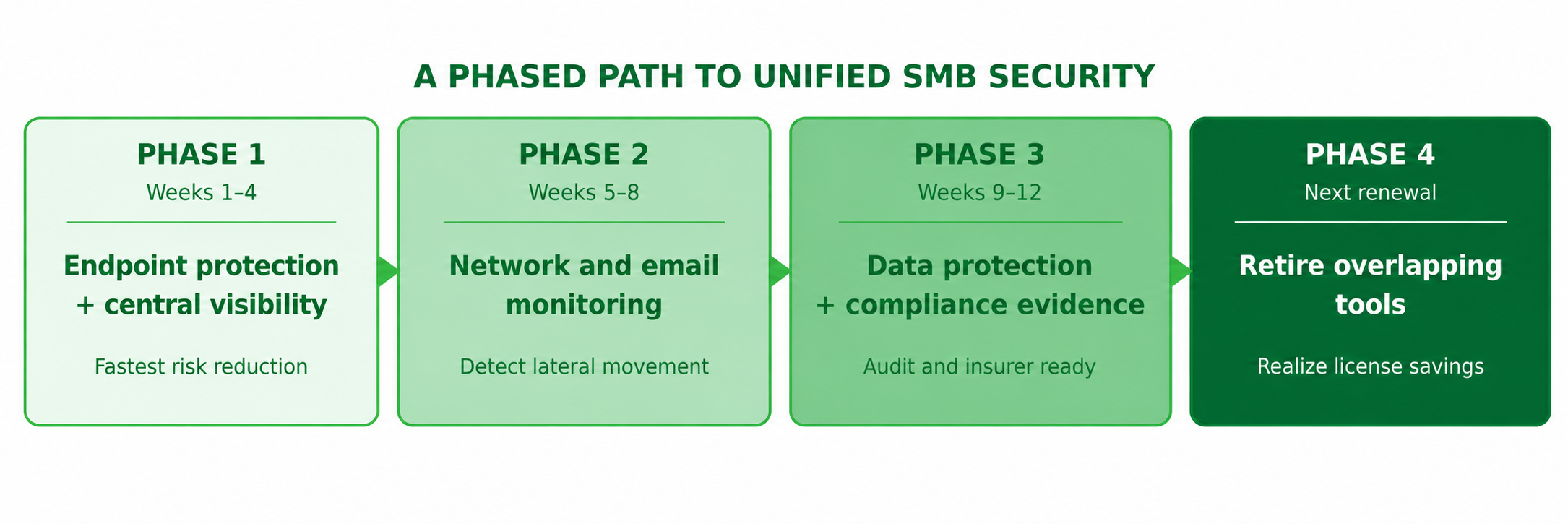 Figure 2. A phased path from point products to unified SMB security
Four Approaches to SMB Security Compared on Cost and Coverage
| Approach | Coverage | Consoles | Staff Effort | Cost Predictability |
| Separate point products | Depends on how many tools you buy | Many | High | Low: many renewals and add-ons |
| Single-vendor suite | Broad within one vendor’s portfolio | Several, sometimes unified | Medium | Medium: modules often priced separately |
| Managed detection and response (MDR) only | Often endpoint-focused | Provider-managed | Low internally | Medium: scope and add-ons vary |
| Unified platform (Seceon) | Endpoint, network, data, email, SIEM, SOAR | One | Low, with automation | High: asset-based, core modules included |
How Seceon Makes Unified Cybersecurity Affordable for SMBs
The Seceon Open Threat Management (OTM) Platform combines endpoint protection, network security, data protection, SIEM, and automated response in one AI-driven platform. It is designed to lower both license costs and the hidden costs of running security.
One license, core modules included
Seceon uses asset-based licensing with core platform modules included, so SMBs are not forced to buy SIEM, SOAR, UEBA, or threat intelligence as separate add-ons. There are no per-GB ingestion charges or alert caps, so costs stay predictable as data grows.
One agent instead of several
The aiXDR-PMax agent combines EDR, endpoint protection, data loss prevention, and file integrity monitoring on Windows, macOS, and Linux. It uses under 50 MB installed and under 1% idle CPU, which reduces both agent sprawl and performance complaints.
Network and email coverage in the same platform
Built-in network detection and response identifies lateral movement and command-and-control traffic, and integrates with the firewalls SMBs already own. Microsoft 365, Google Workspace, and cloud account monitoring, plus aiEmail Security, cover phishing and account takeover.
Automation that saves staff time
SeraAI, Seceon’s AI engine, autonomously resolves 70% or more of routine L1 alerts. Native aiSOAR automates containment, such as isolating a device or disabling a compromised account, in under 90 seconds. For lean teams, fewer manual alerts is where the largest savings come from.
Compliance evidence without extra tools
aiCompliance CMX360 produces audit-ready evidence for frameworks such as PCI DSS, HIPAA, ISO/IEC 27001, and SOC 2. That makes it easier to answer customer questionnaires and cyber insurance requirements without a separate GRC tool.
Delivered in-house or through an MSSP
SMBs can run Seceon themselves or receive it as a managed service from a Seceon MSSP partner. Seceon is available through MSP marketplaces including ConnectWise, Kaseya, N-able, and Datto.
Seceon cost drivers at a glance
| Cost Driver | Seceon Approach |
| Overlapping licenses | One asset-based platform license with core modules included |
| Ingestion-based pricing | No per-GB ingestion charges |
| Multiple agents | One agent for EDR, EPP, DLP, and FIM |
| Alert triage hours | SeraAI resolves 70%+ of routine L1 alerts autonomously |
| Slow manual response | aiSOAR automated containment in under 90 seconds |
| Compliance effort | CMX360 audit-ready evidence from one platform |
| Security staffing | Optional fully managed service through MSSP partners |
| Overall TCO | Up to 58% lower total cost of ownership than a fragmented stack* |
Seceon platform figure; results vary by environment, scope, and existing tools. Module availability can vary by package.
Cost Traps to Avoid When Buying SMB Security Software